A guqin notation editor: jianzipu and staff notation, online
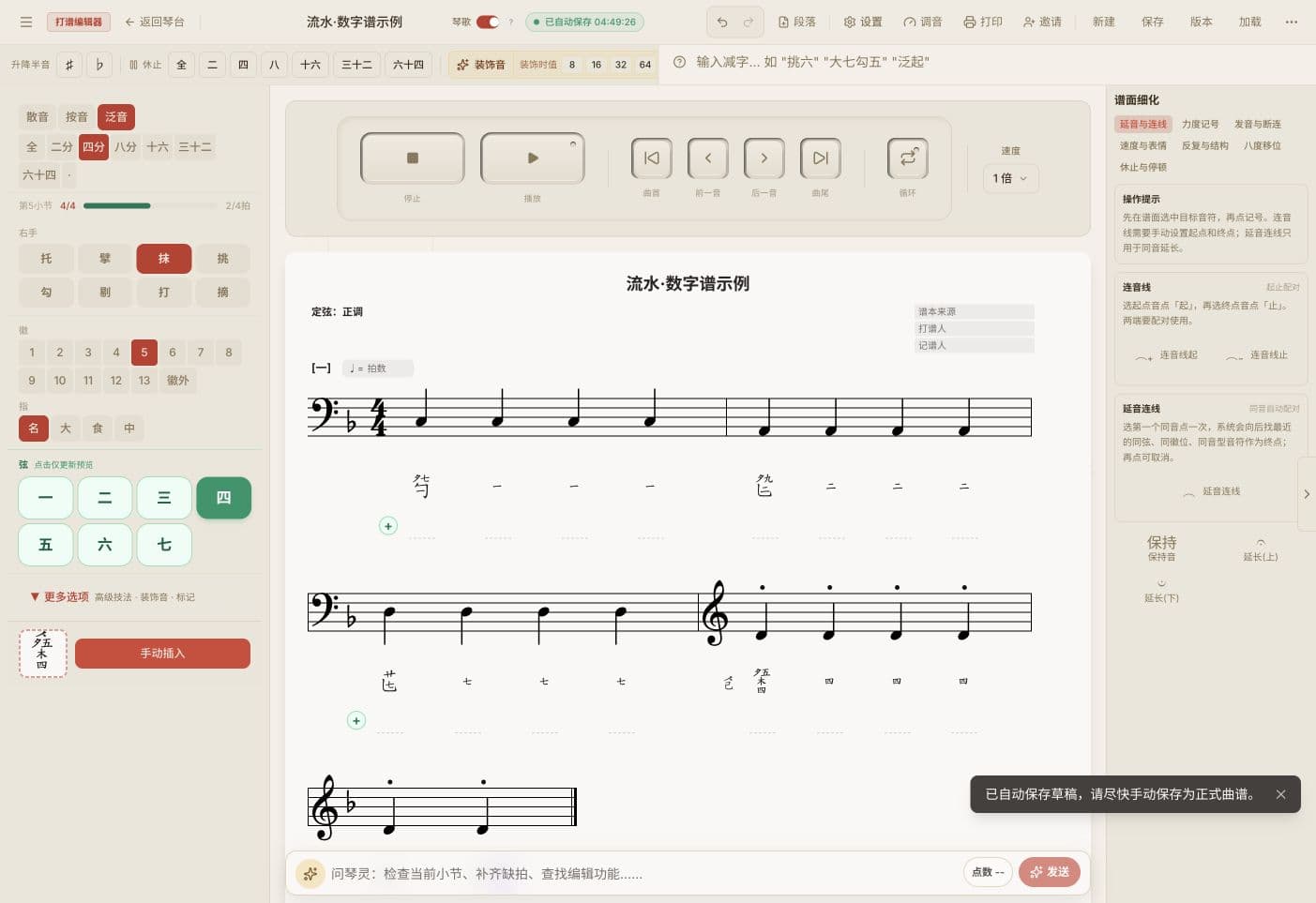
Lingxian helps players turn the results of dapu into clear, editable scores: enter jianzipu, see the staff notation alongside, adjust the tuning and export the page. Nothing to install; basic editing works in the browser.
What does "dapu" mean here?
In the guqin tradition, dapu (打谱) is the work of taking a historical score, establishing its fingerings, tuning, rhythm and phrasing, and playing it until it becomes performable music. Lingxian handles the digital part: it records the fingerings and rhythm you have decided as jianzipu, adds the staff notation, lays out the page and keeps versions. The musical judgment stays with the player.For the full story, read What is dapu?; to get started right away, see the step-by-step guide.
Core features
- Jianzipu entry — All common right-hand strokes (mo, tiao, gou, ti, da, zhai, tuo, pi) and left-hand techniques (yin, nao, chuo, zhu, shang, xia), 37 techniques in all
- Live staff notation — A grand staff (treble and bass clefs) with each jianzipu symbol aligned to its note
- Three ways of sounding — Open strings, stopped notes at a hui, and harmonics at the nodes, with pitch computed automatically
- 11 tunings — Zhengdiao, raised fifth, lowered third and the other common tunings, covering the mainstream repertoire
- 5 modes — The pentatonic modes gong, shang, jue, zhi and yu
- Document and image export — High resolution, ready to print and share
- Cloud storage — Scores save to the cloud automatically and are available anywhere
- Collaboration — Invite collaborators to work on a score together, for societies and teaching
Who it is for
Teaching
Teachers prepare scores in Lingxian and students read and practice online. The aligned staff notation helps beginners see pitch relationships.
Qin societies
Members organize scores together, editing the same piece asynchronously in one consistent format, and export high-resolution documents for the archive.
Personal practice
Players enter the pieces they are practicing, mark fingerings and rhythm, and produce their own practice scores.
Research
Scholars digitize historical handbooks into structured data that can be searched and compared.
Getting started
- Go to lingxian.app and open the editor to try basic editing
- Create a new score in the editor
- Choose a tuning and a mode
- Enter jianzipu symbols from the palette
- The editor generates the staff notation
- Export a document or save to the cloud
Frequently asked questions
Q: What is a guqin jianzipu editor?
A: A digital tool for entering and editing guqin tablature. Lingxian lets you enter symbols directly in the browser, generates the staff notation automatically and exports high-resolution documents.
Q: Which techniques are supported?
A: 37 common techniques: right-hand strokes (tiao, gou, mo, da and others), left-hand techniques (yin, nao, chuo, zhu and others) and compound techniques (cuo, bola, gun and fu and others).
Q: Do I need to install anything?
A: No. Lingxian is a web application; open the site in a browser on a computer or tablet.
Q: Is the editor free? Do I need to install anything?
A: Basic editing is free, including jianzipu entry, staff notation and basic export. For advanced features see the pricing page (in Chinese).
Q: Can several people work on one score?
A: Yes. The cloud library supports asynchronous collaboration, for societies, schools and teacher-student work.